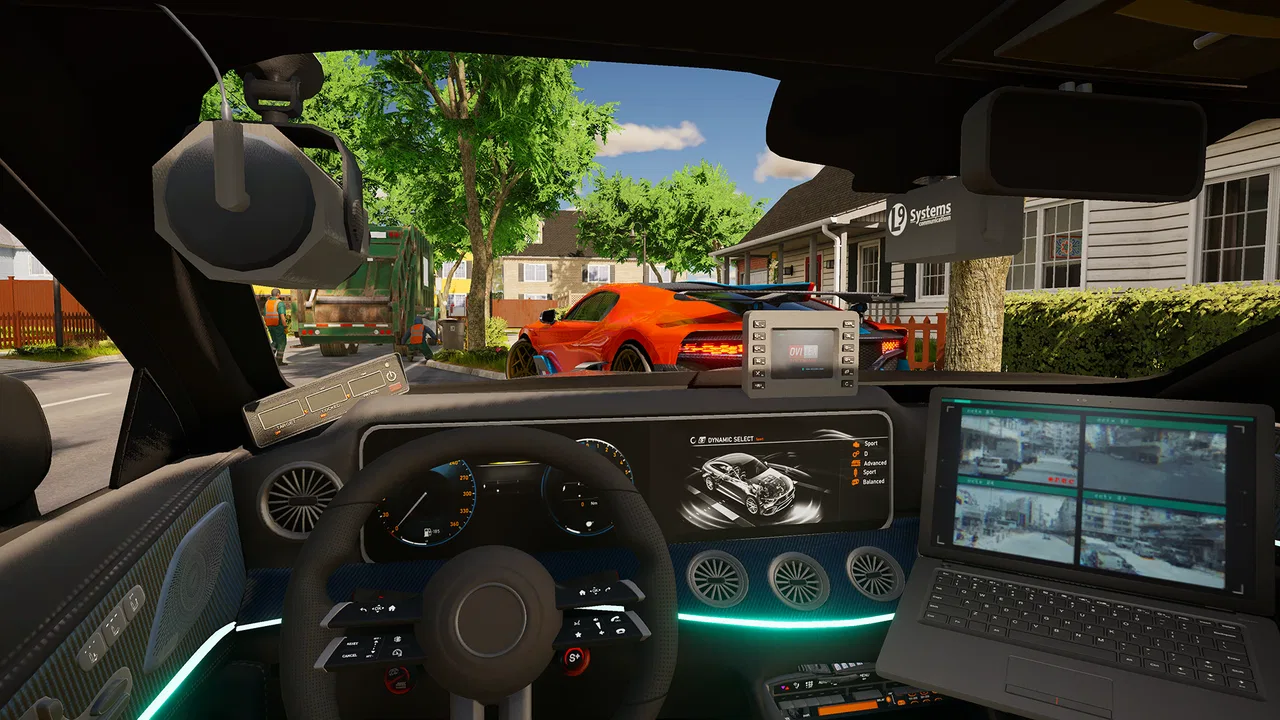
Police Simulator : Car Patrol
- 4.6
- Rating
- 5.00M
- Installs
- Free
- Price

 Analysis by App-foxy
I approached Police Simulator : Car Patrol expecting a quick driving game, but its appeal is slightly different. It puts me behind the wheel of a police car and asks me to enjoy the routine of patrol, pursuit, and enforcement rather than simply chasing a finish line. That makes it a useful choice for players who like the atmosphere of a police driving game and prefer a slower, more hands-on kind of racing experience.
The game is free to download, comes from Ovidiu Pop, and is listed for Everyone 10+. It has attracted over five million installs, with an average score of 4.6 from around 48 thousand ratings. Those figures suggest a broad audience, but they do not mean it will suit every racing fan. I found that the best experience depends heavily on how patiently you approach the controls and how you react when a session does not behave as expected.
Getting comfortable with patrol driving
The first thing that can catch a new player off guard is the difference between this and a conventional arcade racer. In a typical racing game, I expect an obvious route, immediate speed, and a clear emphasis on beating opponents. Here, the police setting changes the rhythm. Driving is the central activity, but the feeling is closer to managing a patrol than completing a standard circuit.
You May Also Like

 Blood Strike: 2.5 Anniversary
Blood Strike’s Loadouts Turn Every Drop Into a Tactical Gamble
A close look at Blood Strike’s custom loadouts: how fast access to signature weapons reshapes its battle royale rhythm, rewards preparation, and narrows the gap between fights.

 Pandora - Music & Podcasts
Pandora’s Music Is Easy to Start, but Harder to Recover
Pandora’s strength is its low-effort path from a seed to a station. Its weak spot is how much confidence it asks you to place in connection, setup, and quiet recovery.

 8 Ball Pool
 Is Built on Rivalries, Rematches, and Routine
A close look at the rivalries, rematches, shared routines, and unanswered safety questions that turn a quick pool match into a persistent mobile community.

 Samsung Music
’s Quiet Strength Is Playing What You Already Own
Its reach comes less from spectacle than from dependable access to a personal library. That simplicity is both the app’s strongest retention engine and its ceiling.

 AccuWeather: Weather Radar
AccuWeather Review: A Quick, Clear Forecast for Everyday Decisions
For everyday plans, the best forecast is the one you can understand quickly. AccuWeather makes rain timing, radar, and local conditions easy to act on, with a few trade-offs.

 Hill Climb Racing
Why Hill Climb Racing Still Turns Crashes Into One More Run
A tiny car, a bumpy hill and one more upgrade: Hill Climb Racing keeps resurfacing because its simple chaos makes every near-miss feel personal.
More From Our News Desk



That distinction matters before you decide whether the game is right for you. If you want constant overtaking, dramatic boosts, and short races with an obvious winner, this may feel restrained. If you enjoy moving through a city environment while imagining a law-enforcement role, the slower pace gives the driving more character. I liked that it leaves room for observation instead of turning every second into a demand for faster reactions.
Controls are the first practical hurdle. On a phone, steering, acceleration, braking, and camera awareness compete for limited screen space. I recommend beginning with short sessions and learning how the car responds before attempting anything that requires quick pursuit driving. Rushing into a chase while still adjusting to steering sensitivity is an easy way to mistake unfamiliar controls for poor performance.
It also helps to keep the phone in a stable position. A loose grip makes small steering corrections harder, especially when your thumb crosses the edge of the display. I found that holding the device with both hands and using small movements gave me more control than making large swipes. This is a simple change, but it has a noticeable effect on a game built around driving precision.
Another common sticking point is expectation. The store summary presents the game as a realistic police car simulator, and that description sets a particular mood. I would not treat “realistic” as a promise that every detail will behave like a full desktop simulation. On a mobile device, the experience is designed to remain accessible, so the right comparison is with other mobile driving games that use a police theme, not with a dedicated simulator played with a wheel and pedals.
What to check before blaming the game
Before playing seriously, I would make a few basic checks. The listed minimum operating system is Android 7.0, so an older device may be outside the supported range. Even when a phone can install a game, age, available storage, background activity, and heat can affect how comfortable it feels during longer driving sessions.
I also suggest closing demanding apps before starting a patrol. This is not a special requirement of this title; it is a practical way to reduce interruptions on a phone that is already working hard. If the game feels uneven only after the device has been used for a long time, let the phone cool down and try again rather than immediately changing every control setting.
Keep your connection stable when downloading or updating the game. A partial or interrupted installation can create confusing symptoms, such as a launch problem or content that does not behave normally. The current listed version is 1.9.106, so checking that the installed build has finished updating is a sensible first step when something appears inconsistent.
There is also a financial detail worth understanding before you settle in. The game is free, but it includes in-app purchases ranging from $1.99 to $84.99 per item. I would decide in advance whether I want to play without spending or whether optional purchases fit my budget. That small bit of planning prevents a free download from turning into an impulsive purchase during a frustrating moment.
For younger players, the Everyone 10+ rating is useful context, but I would still let parents review the purchase settings on the device. The rating tells you the intended age range; it does not replace sensible supervision around spending or screen time.
Recovering when a patrol goes wrong
When a session starts behaving strangely, the best response is usually methodical rather than dramatic. I begin by leaving the current session and launching the game again. If the issue appears only once, it may have been a temporary interruption. If it returns consistently, I compare the circumstances: does it happen after a long play period, during a particular driving situation, or immediately after opening the app?
This simple pattern check is more useful than repeatedly restarting without noticing what changed. For example, if the game runs normally after a fresh launch but becomes uncomfortable after extended play, device heat or background load may be involved. If it fails at the same point every time, an update, installation, or device compatibility issue deserves more attention.
I would avoid clearing saved information as a first reaction. Recovery steps that remove local progress can create a bigger problem than the original glitch. Start with the least disruptive actions: close and reopen the game, restart the device, check for a completed update, and make sure the phone has enough free space for normal operation.
Control problems deserve their own diagnosis. If the car keeps drifting, test whether the issue is your steering input or the game’s response by making very small movements on a quiet stretch. If the car reacts too sharply, reduce the size of your movements before assuming the control system is broken. A screen protector, damp fingers, or an awkward grip can also make touch input feel less predictable.
Audio or visual interruptions can be approached in the same way. First check whether the problem is limited to this game or affects the whole phone. If other apps also show sound or display issues, the game is probably not the main cause. If only this title is affected, a restart and update check are reasonable early steps before considering more disruptive measures.
The most useful recovery habit is to change one thing at a time. If you alter controls, restart the device, clear storage, and reinstall together, you lose the ability to identify what actually helped. A careful sequence is slower for a few minutes but saves time when the problem returns.
When the phone, connection, or expectations are the real issue
Not every rough session points to a defect in the app. Mobile games are affected by the device they run on, and police driving games can expose weaknesses that a simple puzzle game might not. If performance changes with battery level, heat, or the number of open apps, I would investigate the phone’s condition before judging the game itself.
Storage is another overlooked factor. A phone that is nearly full may install updates awkwardly or behave unpredictably when several apps compete for space. I would keep a reasonable amount of free storage and avoid starting a large update while the device is also handling other demanding tasks.
Network conditions can create a different kind of confusion. If a download, update, or account-related step is interrupted, the result may look like a gameplay problem. Trying again on a stable connection helps separate a temporary network failure from an issue inside the game. I would not repeatedly reinstall over a weak connection, because that can simply reproduce the same incomplete process.
There is also a question of device fit. The minimum operating system is Android 7.0, but two phones with the same operating system can still offer very different experiences. Screen size, touch response, available memory, and thermal behavior all influence how pleasant driving feels. Someone using a newer, responsive phone is more likely to enjoy the detailed patrol style than someone struggling with delayed touch input.
The game may also be the wrong choice for your preferred form of racing. I would choose a conventional arcade racer instead if my priority were lap times, competitive events, or instant high-speed action. I would choose a more serious simulator instead if I wanted advanced vehicle setup and dedicated physical controls. This title sits between those extremes: more role-focused than a standard racer, but easier to approach than a specialist simulation setup.
That middle position is its strength and its limitation. It gives casual players a police-themed driving experience without demanding a full gaming rig, but simulation enthusiasts may notice that a phone screen cannot provide the same precision or depth as a dedicated controller. I enjoyed it most when I treated the patrol setting as the main attraction rather than judging every moment by racing-game standards.
Everyday uses and small habits that improve play
A realistic use case is a short evening session when I want something more involved than scrolling but do not want to commit to a long competitive match. I can pick up the phone, drive for a while, and stop when I am ready. That makes the game suitable for casual breaks, provided I am comfortable with a relaxed pace and do not expect every session to deliver a dramatic event.
It can also work for players who enjoy role-play through driving. I found that setting a personal goal, such as maintaining careful control during a patrol or focusing on smooth responses during a pursuit, made the experience more satisfying than simply wandering without purpose. These goals are not official challenges I am claiming the game provides; they are ways I use the existing driving premise to make a session feel more deliberate.
One useful technique is to separate learning from performance. During the first few runs, I focus on steering, braking, and camera awareness rather than trying to complete everything perfectly. Once those actions feel familiar, I can pay more attention to the police role and the wider driving situation. This prevents early mistakes from becoming evidence that the game is too difficult.
Another practical trade-off concerns session length. Longer play can make the game more immersive, but it also gives heat, battery drain, and hand fatigue more opportunity to affect the experience. Shorter sessions are not merely a compromise; they can make the controls feel more consistent and keep the patrol fantasy from becoming repetitive.
Players considering purchases should also wait until they understand the basic loop. Because the game is free and offers items from $1.99 up to $84.99, I would not spend simply to solve an early learning problem. First decide whether the driving style itself is enjoyable. If it is not, additional content or upgrades are unlikely to fix that fundamental mismatch.
Who will enjoy it, and who should skip it?
I would recommend this game to someone who likes police themes, mobile driving, and a more relaxed interpretation of racing. It is especially appealing if you enjoy the idea of patrolling and enforcing the law more than chasing a traditional podium finish. The strong average rating and large install base show that the concept has found an audience, although personal taste still matters more than popularity.
I would be more cautious recommending it to someone who dislikes touch controls or wants immediate, competitive action. Players who expect a tightly structured race every time they open a game may find the patrol format less exciting. The same applies to people who want a deep simulator with extensive hardware support and highly technical vehicle management.
Parents may appreciate the Everyone 10+ classification as a quick guide, while still checking purchase controls before handing the phone to a child. Adults who want a free game should remember that free access and optional spending can coexist. The best approach is to treat purchases as a deliberate choice, not as a necessary part of getting through the opening learning curve.
My practical verdict after using it
Police Simulator : Car Patrol works best when I approach it as a mobile police patrol experience with racing elements, not as a pure arcade racer. Ovidiu Pop has chosen a theme that gives ordinary driving a clear identity, and that identity is the reason to try it. The game is free, supports devices running Android 7.0 or later, and its current version is 1.9.106, making it accessible to a wide range of Android players.
My main advice is to prepare the phone, learn the controls gradually, and troubleshoot in a calm order. Check the operating system, update status, storage, connection, and device temperature before deciding that the game is at fault. When a session goes wrong, restart first, change one variable at a time, and avoid deleting progress as an opening move.
The experience is not ideal for every racing fan. It can feel too measured for players who want nonstop speed, and touch controls will never match a dedicated wheel for serious simulation enthusiasts. Still, if you want a free police-themed driving game that lets you settle into patrols and pursuits rather than simply chase lap records, I think it is worth trying. I would keep it installed for relaxed sessions, while choosing a conventional racer whenever I wanted sharper competition and a clearer win-or-lose structure.
FAQs for Police Simulator : Car Patrol
01What is Police Simulator: Car Patrol about?
Police Simulator: Car Patrol is a driving and law-enforcement game focused on patrolling city streets in a police vehicle. Players generally take on routine duties such as watching traffic, responding to incidents, and maintaining order while exploring an urban environment. The experience is more about patrol-style gameplay and completing missions than fast arcade racing or intense action.
02Can I play Police Simulator: Car Patrol offline?
The game may allow some patrol and driving features to work without a constant internet connection, but availability can depend on the version, device, and how the game was downloaded. Certain advertisements, updates, online services, or optional features may still require internet access. It is best to launch the game once while connected, then test offline play before relying on it without mobile data.
03Is Police Simulator: Car Patrol suitable for children?
Police Simulator: Car Patrol is generally presented as a casual simulation experience, but parents should still review its store rating and content details before installation. The game may include traffic incidents, police-related scenarios, advertisements, or optional purchases. Although it is not primarily designed around graphic violence, the level of realism and in-game advertising can vary between versions and platforms.
04Does Police Simulator: Car Patrol include in-app purchases or advertisements?
Many free mobile games in this category are supported by advertising and may offer optional purchases, and Police Simulator: Car Patrol can include similar monetization depending on the release. Ads may appear between activities or while unlocking features, while purchases could affect vehicles, upgrades, or convenience. Check the official app-store listing for the current pricing, payment details, and available parental controls.
05What devices are recommended for a smooth experience?
A reasonably recent Android or iPhone with updated software should provide the best experience, especially because city environments, vehicle models, and traffic systems can require more processing power than a simple driving game. Older devices may experience longer loading times, reduced graphics quality, or occasional lag. Keep sufficient storage available and install the latest official version for improved compatibility and stability.
Pros
- Large patrol areas make routine drives feel varied.
- Traffic stops provide a satisfying sense of police procedure.
- Vehicle controls are simple to learn on touchscreens.
- Short patrol sessions work well for casual play.
- The simulator offers a calmer alternative to action-heavy games.
Cons
- Some tasks can become repetitive after extended play.
- Pedestrian and traffic behavior occasionally feels unnatural.
- Progression may seem slow without frequent patrol sessions.
- The game can be demanding on older phones.
- Certain features may require ads or in-app purchases.

Police Simulator : Car Patrol
Gallery